Python performance overlay
The execution plane for Python.
pip install epochlyepochly your_script.py
Drop-in acceleration via JIT, multicore, and GPU.
Optimizes when safe, yields when it can't help.
Why Epochly
Speed, safety, and visibility — without changing a line of code.
JIT Compilation
Up to 193x on numerical loops
Numba-backed just-in-time compilation for hot numerical code. No decorators, no type annotations required.
GPU Acceleration
Up to 70x on large arrays
Automatic GPU offloading for large array operations via CuPy. Works with NumPy, SciPy, and compatible libraries.
Multicore Parallelism
Up to 8x on CPU-bound work
Sub-interpreter parallelization and thread pool management. No GIL limitations on Python 3.13+.
Inference Optimization
Zero-config, multi-framework
Auto-detect PyTorch, Transformers, and ONNX Runtime and wrap models with zero measured per-call overhead. Opt in to dynamic micro-batching and result caching when you need them — without touching your model code.
Safety Architecture
Guardrails you control
Circuit breakers, canary validation, drift monitoring, and fallback chains ship as a tested safety library — guardrails for every optimization you choose to enable.
Cost Intelligence
Measurement you can verify
GPU cost estimation, savings projections, and Prometheus/OpenTelemetry exporters ready to wire into your stack — self-reported timings verified against external measurement.
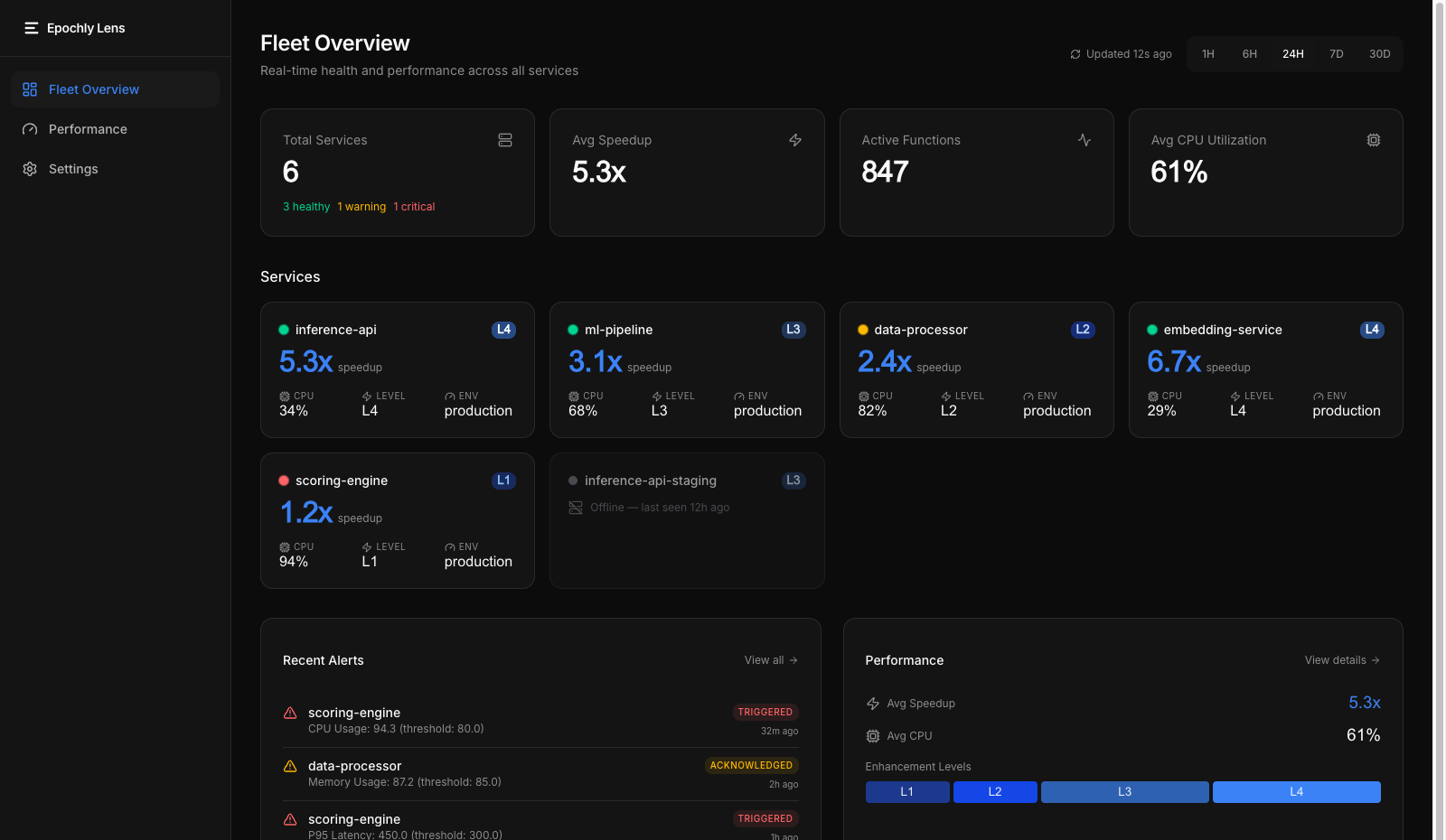
Fleet Dashboard
Real-time service health
See every node's optimization status, speedup, and enhancement level at a glance. Real-time health grid with L0-L4 tracking.
Performance Analytics
Latency, throughput, JIT stats
Latency distributions, throughput trends, JIT compilation statistics, and CPU hotspot identification across your fleet.
Service Drill-down
Per-service detail
Deep-dive into individual services. JIT compilation stats, current enhancement level, and key performance metrics.
Epochly Lens
See your fleet's performance in one dashboard. Real-time service health, optimization coverage, and performance analytics across every node running Epochly.
Get started in 2 minutes
No decorators. No config files. No new API.
# Install$ pip install epochly# Run your existing code$ python your_script.py# Check what Epochly is doing$ python -c "import epochly; epochly.stats()"# Disable instantly$ EPOCHLY_DISABLE=1 python your_script.py# Uninstall cleanly$ pip uninstall epochly
Use cases
Find the right optimization path for your workload
Start with AI inference if you need to cut cost, increase throughput, or add production-safe optimization. Explore broader Python acceleration when your bottleneck is outside inference.
PyTorch inference optimization
Improve PyTorch inference economics without making your first move a serving-stack rewrite.
Explore this pathTransformers inference optimization
A lower-friction path to better transformer-serving economics for Python teams shipping real features.
Explore this pathONNX Runtime optimization
Runtime-specific efficiency and operational fit for teams running production inference.
Explore this pathSafe `torch.compile` in production
Guardrails, fallback, and safer rollout for teams evaluating compile-driven gains.
Explore this pathData science acceleration
Speed up CPU-heavy Python analysis and numerical work when the bottleneck is still in Python execution.
Learn moreML pipelines and preprocessing
Improve preprocessing, scoring, and Python-side pipeline work around model training and inference.
Learn moreFinancial computing
Reduce Python overhead in numerical finance workloads before taking on a rewrite.
Learn moreCPU-heavy web backends
Improve compute-heavy endpoints when the bottleneck is Python execution, not database or network I/O.
Learn moreBenchmarks
Validated on real hardware, reproducible methodology
Per-request wrap overhead
Throughput with opt-in micro-batching
Per-request overhead measured on every backend (PyTorch, Transformers, ONNX Runtime), median and p95. Throughput measured for the opt-in DynamicMicroBatcher on an RTX 4070 (batch sizes 4–32); the two-line epochly.wrap() call passes framework models through with zero added overhead and does not batch automatically. End-to-end GPU cost reduction is not yet measured and is not claimed here.
Peak JIT compilation (Level 2)
GPU acceleration (Level 4)
Overhead when not helping
GPU example: 100M-element array operation: 1,427ms → 21ms (68x)
Reproducible Results
These benchmarks use our open methodology. Run them yourself: pip install epochly && python -m epochly.benchmark
Where Epochly doesn't help
I/O-bound workloads
Network, disk, and database operations. Epochly can't optimize waiting.
Already-vectorized NumPy/SciPy
Already calling optimized C/Fortran code under the hood.
Very small workloads
Process spawn overhead (~200ms) exceeds the computation time.
Sub-10ms single-threaded code
JIT compilation overhead isn't worth it for sub-millisecond operations.
Correctness first. Always.
Performance is worthless if it changes your results. Epochly's safety architecture protects both inference accuracy and runtime correctness.
Progressive Enhancement
Monitors first, optimizes only after stability is confirmed. Your code runs unchanged until Epochly is certain it's safe.
Automatic Fallback
Detects problems and reverts to standard Python automatically. No data corruption, no silent failures.
Instant Kill Switch
Set EPOCHLY_DISABLE=1 to turn everything off immediately. Uninstall leaves no trace.
What's next
Epochly ships today. Here's what we're building next.
Agent Performance Infrastructure
Become the performance layer for AI agent orchestration. Optimize recursive fan-out, manage concurrency, and collapse cold-start latency for agent workloads.
Enterprise Tier
Fleet-wide Lens dashboard, unlimited alerts, 13-month data retention, RBAC with audit logs, and priority support. Everything in Pro plus organizational controls for compliance-driven teams.
Learn moreStart free, then move to Pro when you're ready
Try Epochly without friction. Use pricing to choose your path, checkout when you want unlimited cores and GPU, or contact us if you're evaluating rollout for a team.
Explore inference guides, benchmarks, or the FAQ.